Learn what a simple invoice should include, how to write clearer invoice lines and payment terms, and what Malaysian freelancers and small businesses should check before sending it to a customer.
A simple invoice requests payment for goods or services. In Malaysia, freelancers, service providers, and small businesses can use it to show who is billing, who needs to pay, what was provided, the invoice number, payment details, and the total amount due.
About this guide: This guide helps Malaysian freelancers, students, side-hustle sellers, and small business owners understand the basic parts of a simple invoice. It is for general learning and record-keeping purposes only and should not be treated as professional accounting, tax, or legal advice.
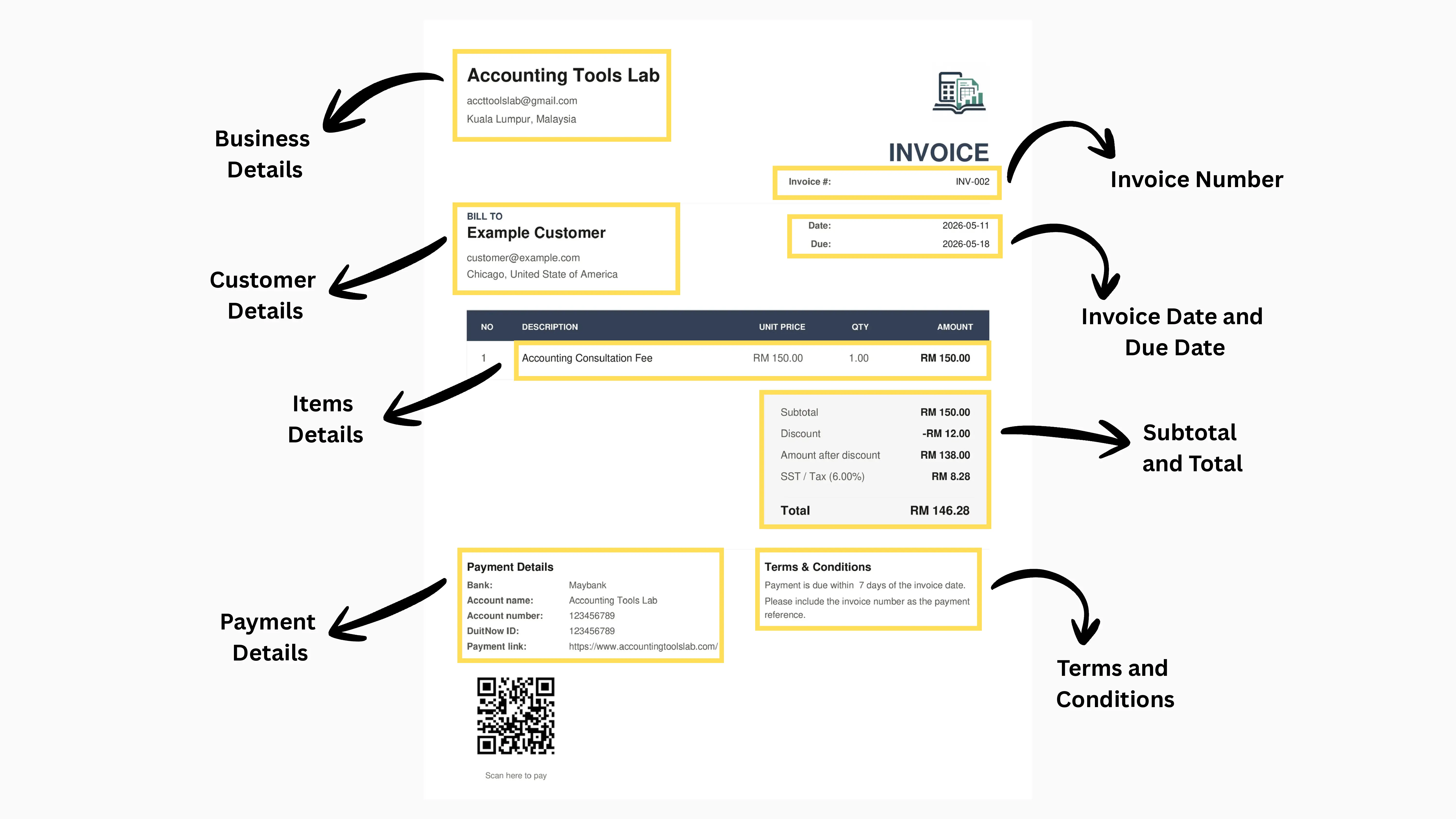
Labeled example of a simple PDF invoice
Want to create one like this? Use the free invoice generator to enter your details and download a PDF invoice for Malaysia.
Subtotal, discount if any, SST/tax if applicable, and total
Payment details, terms, and notes near the bottom
Steps
How to create a simple invoice step by step
1Add your business name, contact details, and logo if you have one.
2Add the customer name and contact details.
3Use a unique invoice number such as INV-001 or INV-2026-001.
4Enter the invoice date and a due date if payment is expected later.
5List each product or service with a clear description.
6Enter quantity and unit price so each line total is easy to check.
7Add any discount before SST or tax if it applies to the invoice.
8Add payment details, payment reference wording, terms, and notes that help the customer pay.
9Preview the invoice, check the total, then download or send the PDF.
Wording examples
Write invoice details clearly
Clear wording helps the customer understand what they are paying for and how to pay. Avoid vague descriptions when a short, specific phrase would be clearer.
Situation
Weak wording
Better wording
Freelance service
Service fee
Website maintenance service for April 2026
Consulting work
Consultation
Accounting consultation session on 11 May 2026
Small business sale
Products
5 boxes of printed labels for May 2026 order
Payment terms
Pay soon
Payment due within 7 days by bank transfer.
Payment reference
Reference payment
Please include invoice number INV-001 as the payment reference.
DuitNow note
Pay by QR
You may pay by bank transfer or the DuitNow QR shown on this invoice.
Example
Simple invoice example
In the example above, Accounting Tools Lab bills Example Customer for one website maintenance service at RM 150. A RM 12 discount reduces the taxable amount to RM 138. SST/tax is shown at 6%, adding RM 8.28, so the final total is RM 146.28.
Description
Quantity
Unit Price
Line Total
Website maintenance service for April 2026
1
RM 150.00
RM 150.00
Discount
-
-
-RM 12.00
Amount after discount
-
-
RM 138.00
SST / Tax 6%
-
-
RM 8.28
Total
-
-
RM 146.28
Common mistakes
Avoid these before sending
Reusing an invoice number
Using vague item descriptions
Forgetting customer details
Missing payment details or terms
Adding SST/tax without checking whether it applies
Treating an unpaid invoice as cash received
Final checklist
Quick check before download
Business and customer names are correct
Invoice number is unique
Invoice date and due date are clear
Line items, quantities, and prices are correct
Discount, SST/tax, subtotal, and total look right
Payment details and terms are easy to understand
Malaysia note
Tax, SST, and MyInvois
For Malaysian users, a simple PDF invoice can help with payment requests and record-keeping, but it is not the same as submitting an e-Invoice through LHDN/MyInvois.
If SST applies to your business, include the SST amount and label it clearly. For SST arithmetic, use the SST Calculator Malaysia or read how to add or remove SST. If you are unsure whether SST or e-Invoice requirements apply, check official guidance or ask a qualified professional.
Cash flow note
Invoice vs receipt and cash flow
An invoice requests payment. A receipt confirms payment was received.
Use the free Invoice Generator to add business details, customer details, line items, optional SST/tax, payment details, terms, and download a PDF invoice.
A simple invoice is a document used to request payment for goods or services. For Malaysian freelancers and small businesses, it usually shows the seller, customer, invoice number, invoice date, line items, payment details, and total amount due.
What should an invoice include?
An invoice should include business details, customer details, invoice number, invoice date, due date if needed, line items, subtotal, tax or SST if applicable, payment details, payment terms, and total. Use clear descriptions so the customer understands what they are paying for.
How do you create a simple invoice?
Start by adding your business and customer details, then add an invoice number, invoice date, line items, quantities, prices, payment details, and payment terms. Check the subtotal, SST or tax if applicable, and final total before sending or downloading the invoice.
Is an invoice the same as a receipt?
No. An invoice requests payment, while a receipt confirms that payment has already been received. For record-keeping, an unpaid invoice should not be treated the same as collected cash.
Can I create an invoice without tax?
Yes, a simple invoice can have no tax if tax does not apply. If you are unsure about SST or other tax treatment, check official guidance or a qualified professional.
What payment terms can I write on an invoice?
A simple payment term can say: Payment due within 7 days by bank transfer. Please include invoice number INV-001 as the payment reference. You can adjust the due date, payment method, and reference wording for your customer.
Can I use the Invoice Generator to create a PDF invoice?
Yes. The Invoice Generator lets you enter invoice details, preview the invoice, and download a simple PDF invoice.
Can Malaysian freelancers use a simple invoice?
Yes. Malaysian freelancers, side-hustle sellers, and service providers can use a simple invoice to request payment and keep basic records. If your business has SST, e-Invoice, or other tax obligations, check official guidance or speak with a qualified professional.
Is a PDF invoice the same as an official Malaysia e-Invoice?
No. A PDF invoice can help with payment requests and simple record-keeping, but it is not the same as submitting an e-Invoice through LHDN/MyInvois. The Invoice Generator does not submit, validate, or connect invoices to MyInvois.